Hello everyone.
This article is about changing the screen on my motorcycle.
I'm writing this in late October.
It's the time of year when riding starts to feel cold, so the aim is to fit a larger screen and take less wind on my body.

This is the screen currently fitted.
It's the screen from the G650GS Sertão, the G650GS's sister model.

I'm replacing the Sertão screen with a Wunderlich screen.
The Wunderlich screen gives a lot of wind protection, which is good in the cold months, but in summer you get no wind at all.
Swapping screens with the seasons is a bit of a chore, but it makes riding more comfortable, and taking the screen off gives me a chance to clean and check various parts of the bike, so I enjoy doing it.

These are the Wunderlich screen fitting instructions.
There's no Japanese explanation, but you can follow the steps just from the illustrations.

These are the tools I used.
- 3 mm hex key
- 4 mm hex key
- T25 Torx bit
- T30 Torx bit
- 3/8-inch (9.5 mm) drive ratchet handle
- 3/8-inch (9.5 mm) drive extension bar (75 mm)
I use Wera hex keys. They grip the bolts well, so I like them.
For Torx, I use Ko-ken bit sockets.

First, remove the screen that's currently fitted.

The screen is off.

Next, fit the Wunderlich screen mounting stay.

This only applies to my bike, but I have a sat-nav stay fitted at the stay mounting point, so I had to work around it.
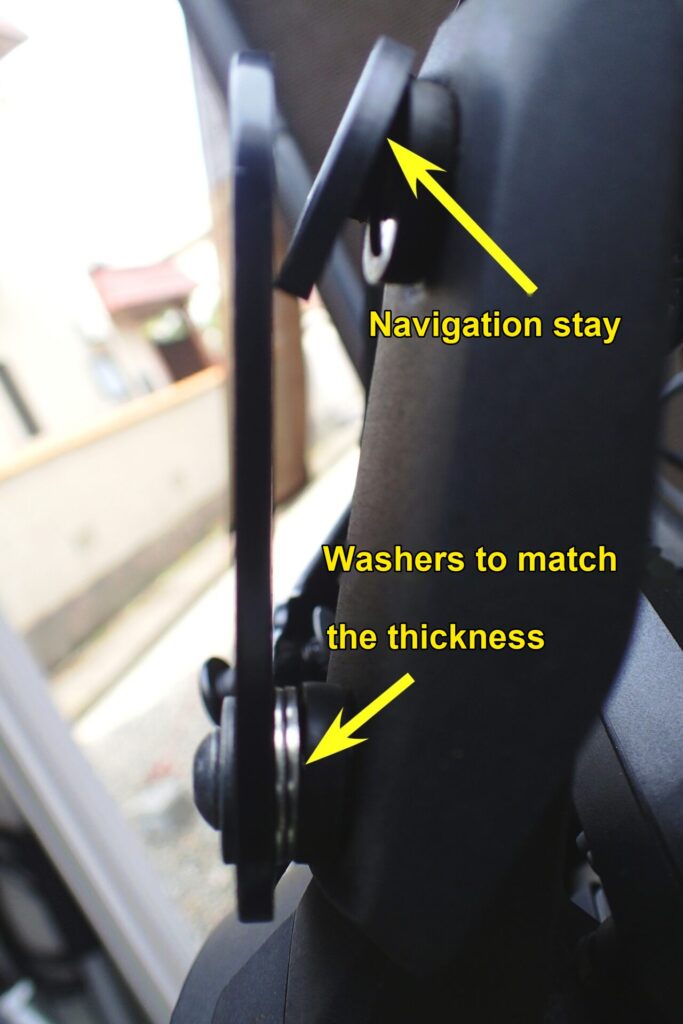
It's a slightly hard photo to read, but it shows the screen stay mounting point from the side.
Of the four points that hold the stay, the upper two have the sat-nav stay sandwiched in them, so I fitted washers of about the same thickness at the lower two.

The front screen stay is fitted.

Next, fit the side stays.
I'll only show the left side here, but the right side needs the same work.
Remove the indicator mounting bolt. Without an extension bar, the ratchet hits the indicator badly.

Also remove the side cowl mounting bolt near the indicator.

In place of the removed bolts, fit the bolts, collars and stays supplied with the screen.

Now the screen can be fitted.
Fix the screen at the three stay points you've fitted, and the job is done.
The angle of the Wunderlich screen can be adjusted a little, so you can set it to the angle you like at this point.
This time I fixed it as close to vertical as possible.

Done!
This screen is pretty big.

Here are before and after photos.
The angles are different, so they may be hard to compare. Sorry about that.

Finally, I clean the screen I removed and put it away until next spring.
By the way, I wrap the screen in an old bath towel when storing it.